



I found Wyndham Hotels & Resorts most useful when a trip involves more than one person and nobody wants to pass a single phone around while trying to agree on a room. It is a free travel and local app from Wyndham Hotel Group, built around searching and booking the group’s hotels rather than acting as a general-purpose travel planner. That focus makes it straightforward for a household, couple, or small group that already knows it wants to consider Wyndham properties.
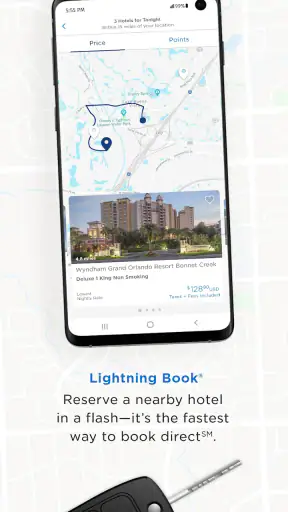
My first impression was practical rather than exciting. The app is not trying to replace every travel tool on my phone. Instead, it gives me a direct way to browse Wyndham accommodation, check a destination, and move toward a reservation. The store summary presents access to more than 8,900 hotels worldwide, so the useful question is not whether it can plan an entire holiday, but whether its hotel search fits the trip I am actually arranging.
Using it when a household is choosing a hotel together
A realistic example is a family driving to another city for a weekend. One adult may be responsible for the booking, while another person checks the location, room arrangement, and timing. On a shared device, that division is easy to understand: one person searches, the others discuss the options, and the person who owns the booking account completes the final steps. I like this arrangement because it keeps the decision visible without pretending that everyone needs their own profile inside the app.
That distinction matters. This is a booking tool, not a household organizer. I would not use it as a shared calendar, a group chat, or a place to delegate travel tasks. The app can support the conversation, but the conversation still happens elsewhere. For a family coordinating from the same sofa, that is perfectly workable. For several travelers booking from different cities, I would pair it with messaging or a shared note so that the final choice does not get lost.
The app’s strongest shared-use quality is its narrow purpose. I can open it when the group has agreed on a destination and wants to compare Wyndham options without sorting through unrelated listings. That reduces distraction. The trade-off is equally clear: if the group wants to compare every hotel brand, independent property, hostel, vacation rental, or transport option at the same time, a broad travel marketplace will be a better first stop.
What I would prepare before opening the search
On a shared phone or tablet, I would decide in advance who is making the reservation and whose contact details should be used. This is a small step, but it prevents an awkward handoff at the payment or confirmation stage. I would also agree on the basic destination, approximate dates, and acceptable hotel area before asking everyone to judge the results. Without that preparation, people tend to react to different priorities: one person looks at distance, another at room type, and another at the total cost.
I would keep the final booking on the device of the responsible adult rather than leaving an account open on a communal phone. That is not a special Wyndham feature; it is simply sensible account hygiene. A shared device can be convenient for browsing, but reservation details are personal travel information. Once the group has chosen, I would close the session or switch back to the device owner’s normal account boundary before handing the phone to someone else.
For a parent arranging a stay with children nearby, I would let the children help with the destination discussion without giving them control of the reservation. The Everyone content rating makes the app suitable in an age-rating sense, but that does not turn a child into the right person to confirm dates or submit booking information. The practical boundary is responsibility, not just age: an adult should review the reservation before it is finalized.
Account boundaries are more important than shared browsing
My advice is to separate “looking” from “booking.” Several people can inspect hotel choices together, but only one person should be responsible for the account and the final reservation. If a partner or relative needs the details, I would share the confirmation through the household’s usual trusted channel rather than leaving the app signed in for everyone.
This approach also helps when a trip changes. If the person who searched is not the person traveling, the booking owner remains clear. That avoids the common household problem where everyone assumes somebody else saved the dates. I would write the selected hotel, arrival plan, and booking reference in a shared note after confirmation, while keeping the actual account under one adult’s control.
There is a limitation here for larger groups. The app can help the group choose a Wyndham property, but it does not replace a coordinator who tracks separate rooms, different arrival times, or individual payment arrangements. If several households are traveling together, I would use the app for each booking decision and another tool for the group’s logistics. Trying to force all coordination into the hotel app would create more work, not less.
How I coordinate a decision without making the app do too much
I get better results by giving each traveler one question to answer. For example, one person checks whether the hotel is convenient for the planned activity, another considers whether the room setup suits the household, and the booking owner checks the reservation details. This keeps the browsing focused and makes the app useful in a shared setting without inventing a complicated workflow around it.
A helpful habit is to take note of the exact property name before switching devices or asking someone else to continue. Hotel searches can feel similar when a destination has several options, and a vague message such as “the Wyndham near downtown” may not be enough. I would also repeat the dates aloud before the last confirmation. That simple pause is especially valuable when children are talking, several adults are multitasking, or the phone is being passed around.
Another trade-off appears when the household is undecided about the destination itself. Wyndham Hotels & Resorts is more useful after the destination has narrowed than during the earliest inspiration stage. For that first stage, I prefer a map or broader travel search. Once the city and approximate area are known, the focused hotel search becomes more efficient because I am no longer comparing unrelated lodging categories.
Age, trust, and who should press the final button
The Everyone rating is reassuring for ordinary family browsing, but I would still treat the app as an adult-managed booking tool. Children can look at locations or help compare names, yet an adult should check the dates, guests, room selection, and final reservation information. The app does not need to be treated like an unrestricted family game simply because its content rating is broad.
For teenagers traveling with relatives or joining a school-related trip, I would make the account boundary explicit: they can receive the itinerary, but the adult who made the reservation should remain the person responsible for changes and confirmation details. That arrangement is clearer than sharing one login among several people. It also avoids confusion if the trip involves a different contact person from the person who will sleep at the hotel.
Trust matters in another way when a household shares devices. I would not assume that every person who can unlock the tablet should be able to access a travel account. Browsing a hotel is low-risk; opening a confirmed reservation may expose names, dates, and travel plans. The safest everyday workflow is to browse together, book from the responsible person’s device, and remove the account from any temporary shared screen afterward.
What the app does well for ordinary trips
The direct connection to Wyndham Hotel Group is the main reason I would keep this app installed. It is free, and its current version is 5.15.0, so it feels like a maintained option for travelers who regularly consider this hotel family. The app has been available since December 12, 2013, which also gives it a long presence rather than making it feel like a brand-new experiment.
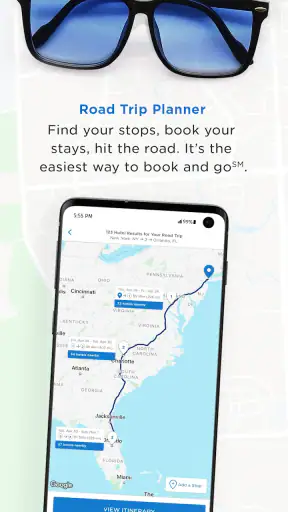
Its audience is broad. A solo traveler can use it for a quick overnight stop, while a household can use it to discuss a longer stay. I especially like the idea of using it before a road trip: instead of waiting until everyone is tired and then searching from a petrol station, the booking owner can compare the destination’s Wyndham choices earlier and keep the decision organized.
The app also benefits from a large user base. It has more than one million installs, an average rating of 4.7 from roughly 65,000 ratings, and about 19,000 written reviews. Those figures do not guarantee that every traveler will have a smooth stay, but they suggest that the app is familiar to many people and has been used well beyond a small test audience.
Where I would choose another travel tool
I would skip this app as my main planner when the hotel brand is not yet part of the decision. A general booking service is better for comparing Wyndham against competing chains, independent hotels, bed-and-breakfasts, apartments, and other lodging types in one screen. The same is true when I need a complete itinerary that combines transport, attractions, restaurant reservations, and accommodation.
I would also be cautious about relying on it alone for a complicated group trip. The app may help identify a suitable Wyndham property, but the household still needs to coordinate who is staying, who is paying, and who receives the confirmation. For a simple room reservation, that is manageable. For several rooms with different travelers, I would use a separate checklist and have one clearly named coordinator.
Another limitation is psychological rather than technical: brand-focused searching can narrow the decision too early. If the group starts by opening the app, it may unconsciously judge only the hotels available within that ecosystem. I prefer to decide whether Wyndham is a reasonable fit first, then use the app when it is. That keeps convenience from becoming a substitute for comparison.
Small habits that make the booking process safer
I would review the reservation from start to finish before confirming, even if another family member has already checked the basic details. Shared decisions create a false sense that someone else must have noticed a mistake. A second review should focus on the dates, number of guests, selected property, and the contact information attached to the booking.
I would also avoid making the booking while the group is still debating. If one person says “that room should be fine” and another is still checking alternatives, wait until the decision is final. This is particularly important on a shared device, where a child may tap the screen or another adult may interpret a discussion as approval. The app can present the choice, but the household needs a clear verbal handoff before the responsible person proceeds.
For repeat travel, I would keep a simple record of which Wyndham property the household considered and why. That helps on the next trip, especially when a family has learned that a certain area is inconvenient for its route or that a particular location works well for an early departure. The app handles the immediate search; the household’s own notes preserve the experience that the app cannot know.
My household verdict
After using it as a focused hotel-booking app, I see Wyndham Hotels & Resorts as a good fit for people who already want to explore Wyndham accommodation and value a direct, uncomplicated path to a reservation. It works especially well when one adult owns the booking and the rest of the household contributes opinions without needing access to the account.
I would recommend it to couples, families, and road-trip planners who want to search Wyndham hotels from a phone, while keeping expectations realistic. It is not a universal travel planner, not a group-management system, and not a replacement for a broad comparison service. Its strength is being specific.
The best household workflow is simple: agree on the destination, browse together, keep account access with the responsible adult, verify the final details, and record the confirmation somewhere the travelers can trust. With those boundaries, the app becomes useful without turning a shared device into a shared account.
For me, the free price and focused hotel search make it worth trying if Wyndham properties are already on the shortlist. Travelers who want the widest possible lodging comparison should begin elsewhere and use this app later as a brand-specific option. That is the honest dividing line: choose it for direct Wyndham booking, not for complete trip planning.


